

Upwork Payment Method Not Verified: What 67,352 Jobs Show (2026 Data)
Short answer: about 1 in 5 public Upwork jobs (20.9%) comes from a client whose payment method is not verified. Almost all of them are new to hiring: 99.8% have never hired anyone. Most did not post again before our window ended on 30/09/2026. But not all of them are dead ends. Of the unverified clients who did post again, 54.1% had verified by a later job, and 25.0% had hired someone.
We read 322,721 public Upwork job posts from July to September 2026 and followed each client across their posts. Here is what "payment method not verified" really tells you, and how to decide if a job is worth your Connects.
What "payment method not verified" means on Upwork
Upwork's own help page says the label means "The client hasn't verified their billing method on Upwork yet OR There's an issue with their existing billing method, such as it has expired." (Upwork Help)
The same page is clear about the risk:
"You don't have to avoid these clients, but you should know that: We can't process payments to you until the client successfully completes billing method verification. Even if you have an hourly contract, we do not provide Upwork Hourly Protection when the client doesn't have a verified payment method."
So applying is allowed. Starting work before the client verifies is the risky part.
1 in 5 Upwork jobs comes from an unverified client
Of the 322,721 public jobs in our window, 255,369 came from verified clients and 67,352 from unverified ones. That is 20.9%, about 1 in 5. Every public job had a status, so there was no "unknown" bucket.
The share is not the same everywhere:
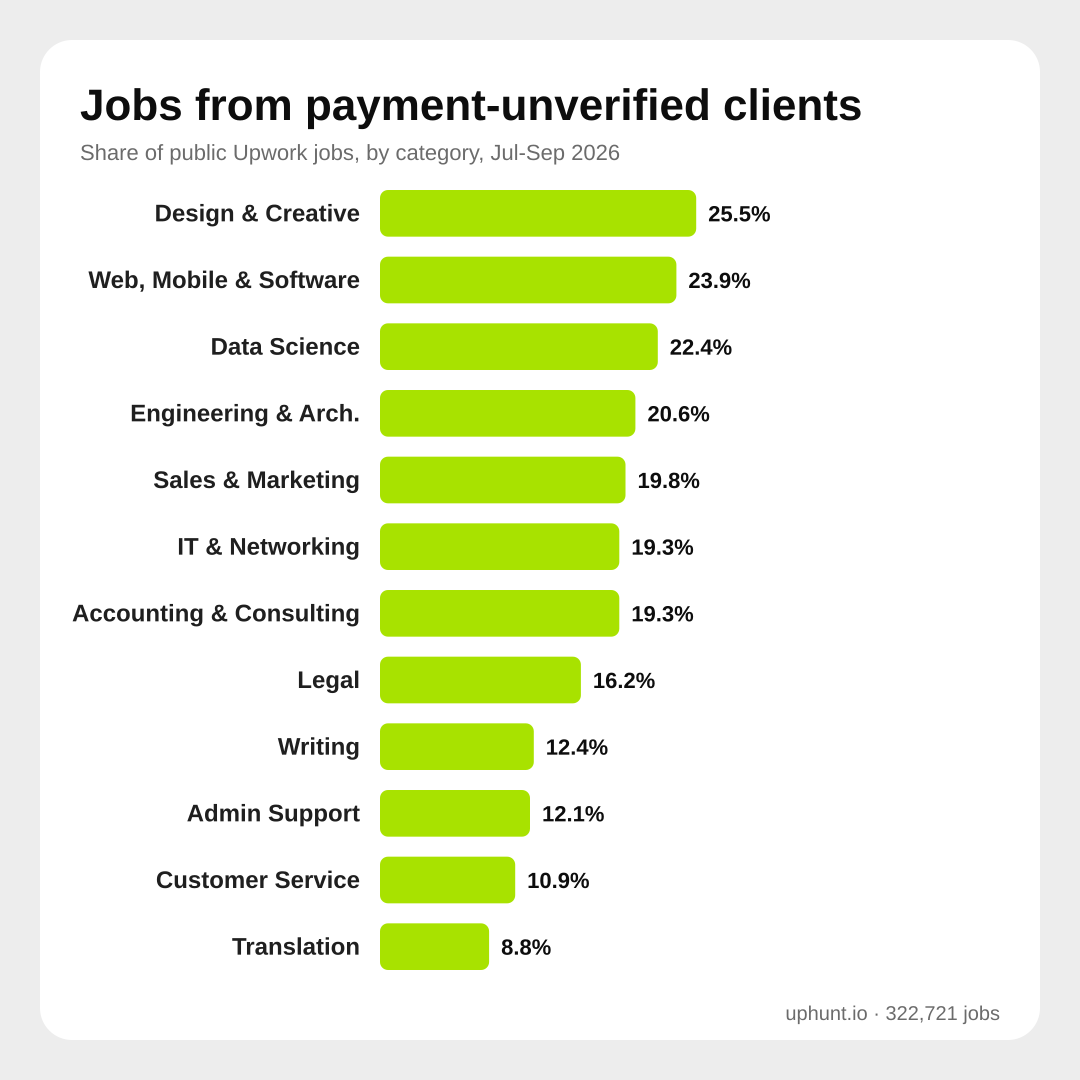
- Design & Creative: 25.5%, the highest. About 1 in 4 jobs.
- Web, Mobile & Software Dev: 23.9%.
- Data Science & Analytics: 22.4%.
- At the bottom: Writing 12.4%, Admin Support 12.1%, Customer Service 10.9% and Translation 8.8%.
It also moves with the client's country. Clients in the US (16.5%) and the UK (16.9%) sit below the average. Clients in India (47.9%), the Philippines (33.9%) and Pakistan (27.1%) sit well above it. If you work in design or development, or you see a lot of jobs from those markets, this label will show up in your feed often. Our client spend by country data has more on where Upwork jobs come from.
Who these clients are: first-time clients, often brand-new accounts
The unverified label almost never sits on an experienced client:
- 99.8% of unverified jobs came from clients with zero hires on record.
- 99.9% came from clients with zero reviews.
- Only 104 (0.2%) came from a client with any spend on record.
Compare that with verified clients: 18.5% of their jobs came from clients with zero hires.
Many accounts are also very new. Upwork shows a client start date on 40.9% of unverified jobs. Where it does, 47.2% of those clients joined less than 7 days before the post. For verified clients the same figure is 5.5%.
So the real question is not "verified or not". It is "a first-time client who has not set up billing yet, or a first-time client who has". Both have no history. Only one has done the billing step Upwork asks clients to do.
Unverified clients don't post smaller budgets
You might expect unverified clients to post tiny jobs. They don't. Comparing unverified clients with zero hires against verified clients who also have zero hires:
- Hourly: the median top rate is $30/hour for both (30,785 unverified and 21,379 verified first-time hourly jobs).
- Fixed price: the median budget is $200 for unverified jobs and $150 for verified first-time clients (25,640 and 19,177 jobs).
So budget size does not separate unverified clients from verified first-time clients. It is just not the signal here, wich surprised us.
What happened next: 1 in 4 who came back hired someone
This is the part that is rarely measured. We grouped every post by client and looked at clients whose first post in the window was unverified.
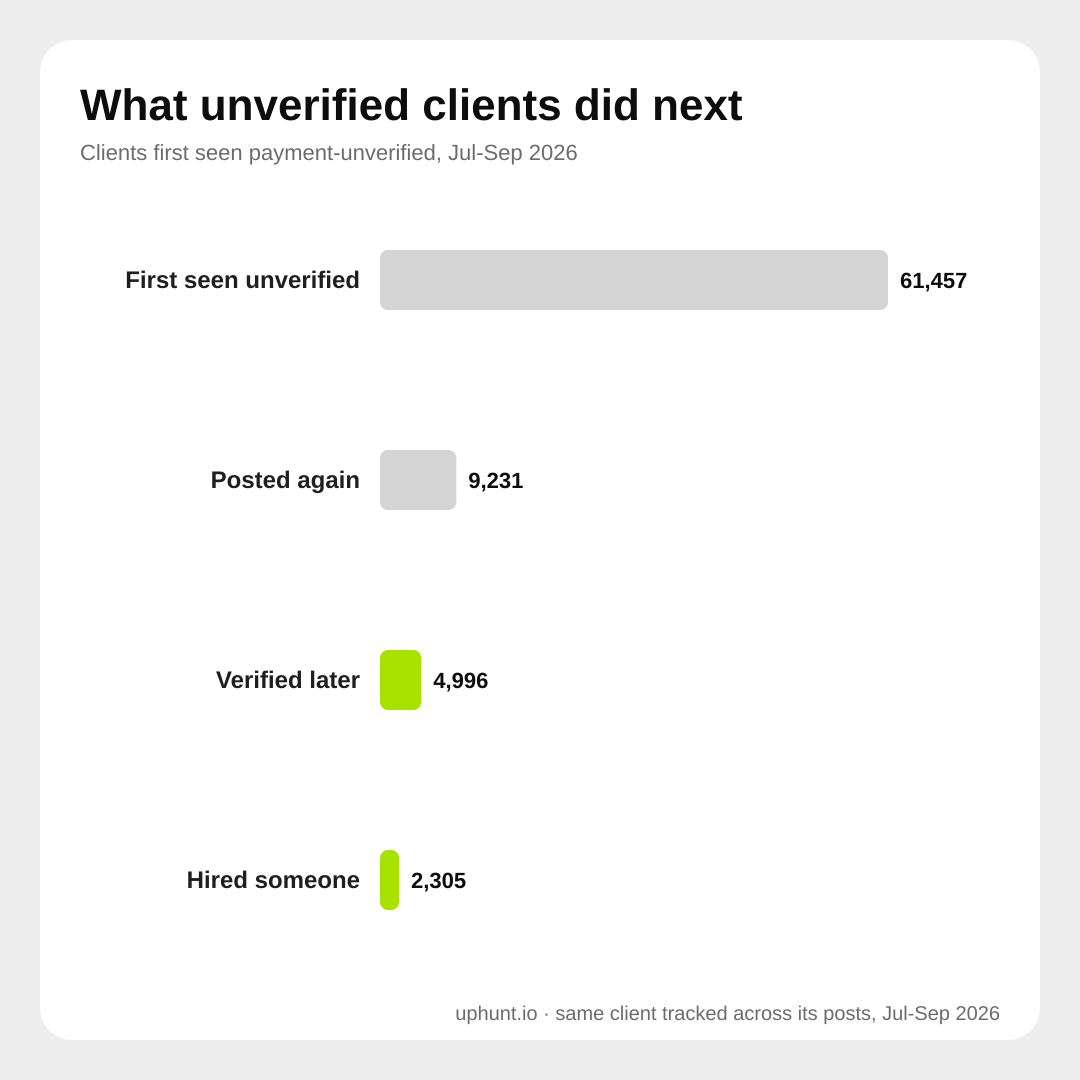
- 61,457 clients first showed up unverified.
- 52,226 of them (85.0%) never posted again in the window. We can't see what they did after that.
- 9,231 (15.0%) posted again. Of those:
- 4,996 (54.1%) were verified by a later post.
- 2,305 (25.0%) had hired someone by a later post.
- Of the 2,305 who hired, 2,303 also showed as verified on a later post.
Two things to take from this. First, some unverified clients are just early. More than half of those who came back had sorted out billing. Second, hiring and verification go together. In our data, a client who hired almost always showed as verified on a later post.
One limit to keep in mind: a client who verified and hired from their very first post, then never posted again, is invisible to us. Clients first seen late in September also had little time to come back. So the real number of unverified clients who went on to post again, verify or hire is likely higher than what we can count.
Should you apply to an unverified client?
Here is a simple way to decide, based on the data above:
- Don't skip them all. That rules out 1 in 5 jobs, and in Design & Creative 1 in 4. Some of these clients do verify and hire, and a new client has no other freelancer they already trust. Our post on first-time Upwork clients explains why new clients can be the easiest wins.
- Spend Connects on the clear ones. A clear brief, a sensible budget and specific screening questions are good signs. Our screening questions data shows what real clients ask.
- Never start work untill the client verifies. Upwork can't pay you until billing is verified, and hourly work has no protection without it. On fixed-price work, wait for a funded milestone. Upwork puts it simply: "If a milestone isn't funded in advance, we can't help recover payment later." (Upwork Help)
- Watch the other red flags. Off-platform contact, pressure to start now, or a brief that makes no sense. Our Upwork red flags guide lists them.
Method
We scanned every job post in our Upwork dataset first seen between 01/07/2026 and 30/09/2026: 372,754 posts, of which 322,721 had a public job payload (posts without one are left out). Payment status comes from Upwork's own isPaymentMethodVerified field at the time we saw the post. Hires, reviews and spend come from the client stats on the same post. A missing spend value counts as $0 when the client has zero hires, because Upwork leaves that field out for clients who never spent. Account age is the time between the client's Upwork start date and the post, and is only counted where Upwork shows that date. Pay figures are medians of the advertised top hourly rate and the fixed budget. The follow-up groups posts by Upwork's client company ID and only sees posts inside the window. Our data stores some client countries as codes and some as names, so the two were merged and each country is counted once. Numbers are counts of real posts, not survey answers.
Filter them out, or keep them in, on purpose
UpHunt's feed has a "Payment verified only" switch. It hides jobs from clients Upwork reports as payment-unverified, and keeps jobs where the status can't be read. Leave it off if you want first-time clients and are happy to wait for verification before you start. Turn it on if your Connects are tight. Every job also gets an AI score with a plain reason, and the job details flag an unverified payment method so you see it before you write a word.
You can get our Upwork jobs dataset on the Upwork jobs data page, or start a free 7-day trial of UpHunt Basic and set the filter the way that fits your Connects budget.