

What Upwork Client Trust Signals Actually Look Like in 2026 (Data)
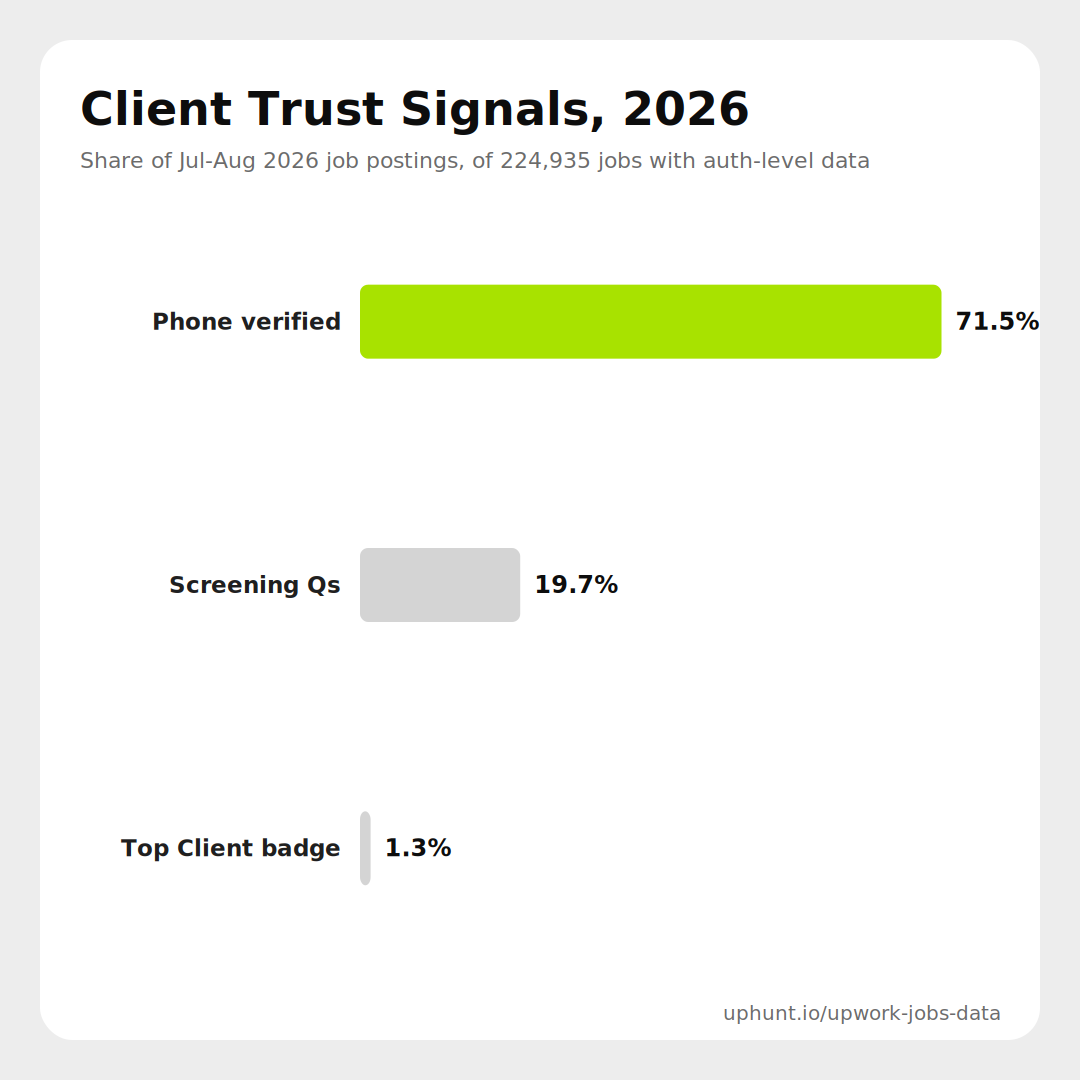
Every "how to spot a bad Upwork client" guide, ours included, tells you to check for phone verification and payment history before you spend a connect. What none of them tell you is how common those signals actually are across the jobs you are seeing right now. We pulled every job UpHunt scraped between July 1 and August 23, 2026, roughly 225,000 postings, and measured three trust signals directly from Upwork's own client data: phone verification, screening questions, and the "Top Client" badge.
The method
This is a snapshot, not a trend. UpHunt only started capturing Upwork's authenticated client-detail data (phone verification status, the Top Client flag, and screening-question content) reliably in mid-2026, so there is no clean 2025 baseline to compare against yet. What follows describes what current job postings look like, not how they have changed. Of 225,591 jobs scraped in the window, 224,935 (99.7%) carried this auth-level client data, which is the base for every percentage below.
Phone verification is the norm, not the exception
71.5% of jobs come from clients with a verified phone number. That is a majority by a wide margin, and it is worth recalibrating around: if you are screening out every unverified client on principle, you are ruling out roughly 3 in 10 postings, not the rare outlier. Unverified does not automatically mean risky, plenty of legitimate first-time clients have not gone through verification yet, but a verified phone is the single most common individual trust signal in the dataset, and the cheapest one to check before you apply.
Screening questions show up on 1 in 5 jobs
19.7% of jobs include at least one screening question at the opening stage. That is a meaningful minority, not a rarity, but it is also far from universal, meaning the absence of a screening question is not itself a red flag. Where they do appear, screening questions tend to correlate with clients who have thought through what they need, which is a soft but real signal worth weighing alongside the harder ones. If your budgeting connects, jobs with screening questions are worth the extra few minutes it takes to answer them properly rather than copy-pasting a template; that is also the segment where a plain-language reason for applying, not just a generic pitch, tends to matter most.
The "Top Client" badge is genuinely rare
Only 1.3% of jobs carry Upwork's own Top Client designation. This is Upwork's internal signal for its most established, highest-spending buyers, and the data confirms it is reserved for a small slice of postings, not a common badge you should expect to see regularly in your feed. If you do spot it, treat it as a real, Upwork-verified signal rather than one more thing to second-guess. For everyone else, the other two signals, phone verification and screening questions, are doing the actual day-to-day work of separating clients worth your connects from the ones that are not.
What this means for how you spend connects
Put together, the picture is one of a small number of hard, rare signals sitting on top of a much larger pool of ordinary but usually legitimate postings. Most jobs will not carry a Top Client badge, most will not include a screening question, and a solid majority will have a verified phone on file. None of these signals should be used in isolation. A verified phone with no other red flags is a reasonable green light. An unverified client with a vague brief and a suspiciously wide budget range deserves the extra scrutiny we cover in our Upwork red flags guide.
This also matters if you are newer to the platform. Our guide to landing first-time Upwork clients already makes the case that unverified, no-history clients are not automatically a red flag, they are often just new to hiring. This data backs that up: with 3 in 10 clients unverified, treating verification as a hard filter would cut you off from a large, mostly legitimate part of the market. The smarter approach is weighing all three signals together, quickly, before you spend a connect rather than after.
That is the exact judgment call UpHunt's scoring is built to make for you. Every job in your feed gets a 1-10 score with a plain-language reason that already accounts for client signals like these, so you are not manually cross-checking phone verification and screening questions on every posting yourself. If you are running a full Upwork operation, our Agency Plus setup guide covers how a dedicated business developer applies the same judgment at scale.
Try UpHunt free for 7 days and let the scoring flag the client signals for you.