

GigRadar vs GetMany vs UpHunt: Which Upwork Automation Tool Wins in 2026?
Choosing the right Upwork automation tool can make or break your freelance pipeline. GigRadar, GetMany, and UpHunt each promise to help you land more clients, but they take different approaches. This comparison breaks down what matters most: speed, AI quality, filtering, team support, and cost.
Quick Overview
| Feature | GigRadar | GetMany | UpHunt |
|---|---|---|---|
| Primary Focus | Agency lead generation | Solo freelancer automation | Speed + precision filtering |
| Alert Speed | Minutes | Minutes | Seconds |
| AI Scoring | Qualification-based | Keyword-based | Contextual 1-10 scoring with explanations |
| Notification Channels | Email, dashboard | Email, browser | Slack, Telegram, email, push, webhooks |
| Team Features | Agency workflows | Limited | Shared rules, role-based alerts, audit trails |
| Proposal Automation | Yes | Yes | AI-assisted with context |
| Filtering Depth | Moderate | Basic | Advanced (exclusions, budget, geography, client history) |
GigRadar: Built for Agencies
GigRadar positions itself as an AI-powered business manager for Upwork freelancers and agencies. It shines when you need a managed workflow with lead qualification and profile optimization tips.
Strengths
- Agency-oriented workflows: Designed with teams in mind from the start
- Lead qualification: Scores leads based on fit for your agency
- Profile optimization: Offers suggestions to improve your Upwork presence
- Proposal automation: Drafts proposals based on job context
Weaknesses
- Slower alerts: Jobs appear in minutes, not seconds
- Upwork-only: No support for other freelance platforms
- Higher price point: Agency pricing can be steep for solo freelancers
- Limited notification channels: Fewer ways to receive alerts
Best for
Agencies with multiple team members who need structured lead management and don't mind paying premium pricing. If you're already on GigRadar and weighing a switch, see our deeper breakdown of GigRadar alternatives for context.
GetMany: Simple Solo Automation
GetMany targets individual freelancers who want a straightforward tool to monitor jobs, score them, and generate AI proposals without complexity.
Strengths
- Easy setup: Minimal configuration to get started
- AI proposal drafting: Generates cover letters automatically
- Keyword-based scoring: Simple relevance matching
- Budget-friendly: Lower entry cost for solo users
Weaknesses
- Basic filtering: Limited exclusion and inclusion controls
- Slower notification delivery: Not optimized for speed
- Solo-focused: Lacks team collaboration features
- Fewer channels: Limited to email and browser notifications
Best for
Solo freelancers who want a simple, affordable tool and don't need advanced filtering or team features. For a side-by-side of replacements, browse our GetMany alternatives roundup.
UpHunt: Speed + Precision
UpHunt focuses on getting you to the right jobs first. The real-time pipeline delivers alerts in seconds, while contextual AI scoring explains why each job matches, or doesn't.
Strengths
- Fastest alerts: Jobs hit your Slack, Telegram, or inbox within seconds of posting
- Explainable AI scoring: Each job gets a 1-10 score with reasons, not just a number
- Deep filtering: Keywords, exclusions, budget ranges, geography, client history, and payment verification
- Multi-channel delivery: Slack, Telegram, email, push notifications, and webhooks
- Team-ready: Shared rules, role-based alerts, and audit trails for agencies
- Threshold control: Set minimum scores per channel to reduce noise
Weaknesses
- Learning curve: More options means more initial setup time
- Feature density: Can feel overwhelming if you only need basics
Best for
Freelancers and agencies who compete on speed and need precise control over which jobs reach them, and how.
Head-to-Head Comparison
1. Alert Speed
| Tool | Typical Delay |
|---|---|
| GigRadar | 2-5 minutes |
| GetMany | 2-5 minutes |
| UpHunt | Under 30 seconds |
On Upwork, early applicants have a measurable advantage. UpHunt's real-time processing means you're often applying while competitors are still waiting for notifications. We unpack the speed-vs-conversion math in our Q1 2026 competitive advantage analysis.
2. AI Scoring Quality
GigRadar uses qualification-based scoring that evaluates whether a lead fits your agency profile. Useful, but opaque.
GetMany relies on keyword matching. If your keywords appear, the score goes up. Simple but misses context.
UpHunt scores 1-10 with visible reasoning. You see exactly why a job scored high (e.g., "Client has 95% hire rate, budget matches your range, skills align with your profile"). This transparency helps you trust, and tune, the system.
3. Filtering Controls
| Capability | GigRadar | GetMany | UpHunt |
|---|---|---|---|
| Keyword inclusion | Yes | Yes | Yes |
| Keyword exclusion | Limited | Limited | Yes |
| Budget ranges | Yes | Yes | Yes |
| Geography filters | Partial | No | Yes |
| Client history checks | No | No | Yes |
| Payment verification | No | No | Yes |
| Exclusion patterns | No | No | Yes |
UpHunt's filtering lets you exclude specific phrases, low-rated clients, unverified payments, and geographic regions, before alerts ever fire.
4. Notification Channels
| Channel | GigRadar | GetMany | UpHunt |
|---|---|---|---|
| Yes | Yes | Yes | |
| Slack | No | No | Yes |
| Telegram | No | No | Yes |
| Push notifications | No | Yes | Yes |
| Webhooks | No | No | Yes |
If you live in Slack or Telegram, UpHunt meets you where you work. Webhooks enable custom integrations, pipe jobs into your CRM, spreadsheet, or Zapier workflow.
5. Team and Agency Support
GigRadar: Built for agencies with multi-seat plans and managed workflows.
GetMany: Designed for solo freelancers. Team features are limited or absent.
UpHunt: Supports both. Teams get shared filter rules, role-based notification routing, and audit trails showing who applied to what and when.
6. Proposal Automation
All three offer AI proposal generation, but implementation varies:
- GigRadar: Drafts proposals based on job and agency profile
- GetMany: Generates cover letters from job descriptions
- UpHunt: AI-assisted proposals with context from your profile, past wins, and job-specific details
Pricing Comparison
Pricing changes frequently, so verify current rates on each platform's website.
| Tool | Starting Price | Notes |
|---|---|---|
| GigRadar | ~$49/month | Agency plans higher |
| GetMany | ~$19/month | Solo-focused tiers |
| UpHunt | Free tier available | Paid plans scale with usage |
UpHunt offers a free tier to test core features before committing. This lets you validate the speed and filtering quality without upfront spend.
Migration Checklist
Switching from GigRadar or GetMany? Follow these steps:
- Export your filters: Save current keywords, exclusions, and budget settings
- Recreate rules in UpHunt: Use strict exclusions to match your existing noise reduction
- Set channel thresholds: Route high scores (8+) to Slack, lower scores to email digest
- Test on live jobs: Run 5-10 jobs through the system and compare scoring
- Measure response rates: Track replies and hires for two weeks
- Overlap briefly: Keep your old tool running in parallel during the transition
When to Choose Each Tool
Choose GigRadar if:
- You run an agency with multiple team members
- You prefer a managed, structured workflow
- Speed isn't your primary competitive advantage
- You want built-in profile optimization
Choose GetMany if:
- You're a solo freelancer on a tight budget
- You want simple setup with minimal configuration
- Basic keyword matching meets your needs
- You don't need team features
Choose UpHunt if:
- Speed to apply is your competitive edge
- You need advanced filtering to reduce noise
- You want explainable AI scores you can trust and tune
- You work in Slack, Telegram, or need webhook integrations
- You're scaling from solo to team and need audit trails
If you're still weighing whether automation itself is the right call, read Upwork auto-apply ethics in 2026: what's allowed vs. banned before you commit to any tool.
FAQ: GigRadar vs GetMany vs UpHunt in Mid-2026
Which tool has the fastest alerts in mid-2026?
UpHunt. As of June 2026, UpHunt's real-time pipeline delivers most Upwork job alerts in under 30 seconds, while GigRadar and GetMany still cluster in the 2-5 minute range based on our internal benchmarks and user reports. If speed-to-apply is your edge, that gap is the difference between landing in the first 10 proposals or the first 50.
Is it worth running two Upwork tools in parallel?
Short-term, yes. For a 1-2 week overlap during migration, parallel runs let you compare scoring quality and alert latency on the same jobs without flying blind. Long-term it's wasted spend and duplicate noise. Pick the tool that consistently surfaces jobs you'd actually apply to and cancel the other once you trust the new pipeline.
Does UpHunt support LinkedIn job alerts too?
Not yet for LinkedIn job posts specifically. UpHunt's current focus is Upwork real-time alerts, scoring, and auto-apply. If you want broader marketplace coverage, our Upwork alternatives guide covers where freelance demand actually lives in 2026.
Verdict
GigRadar and GetMany are solid tools for their target users, agencies wanting managed workflows and solo freelancers wanting simplicity, respectively.
UpHunt wins on speed and precision. If being first to apply matters, if you're drowning in irrelevant alerts, or if you need to scale from solo to team, UpHunt's real-time pipeline, explainable scoring, and deep filtering give you an edge the others can't match.
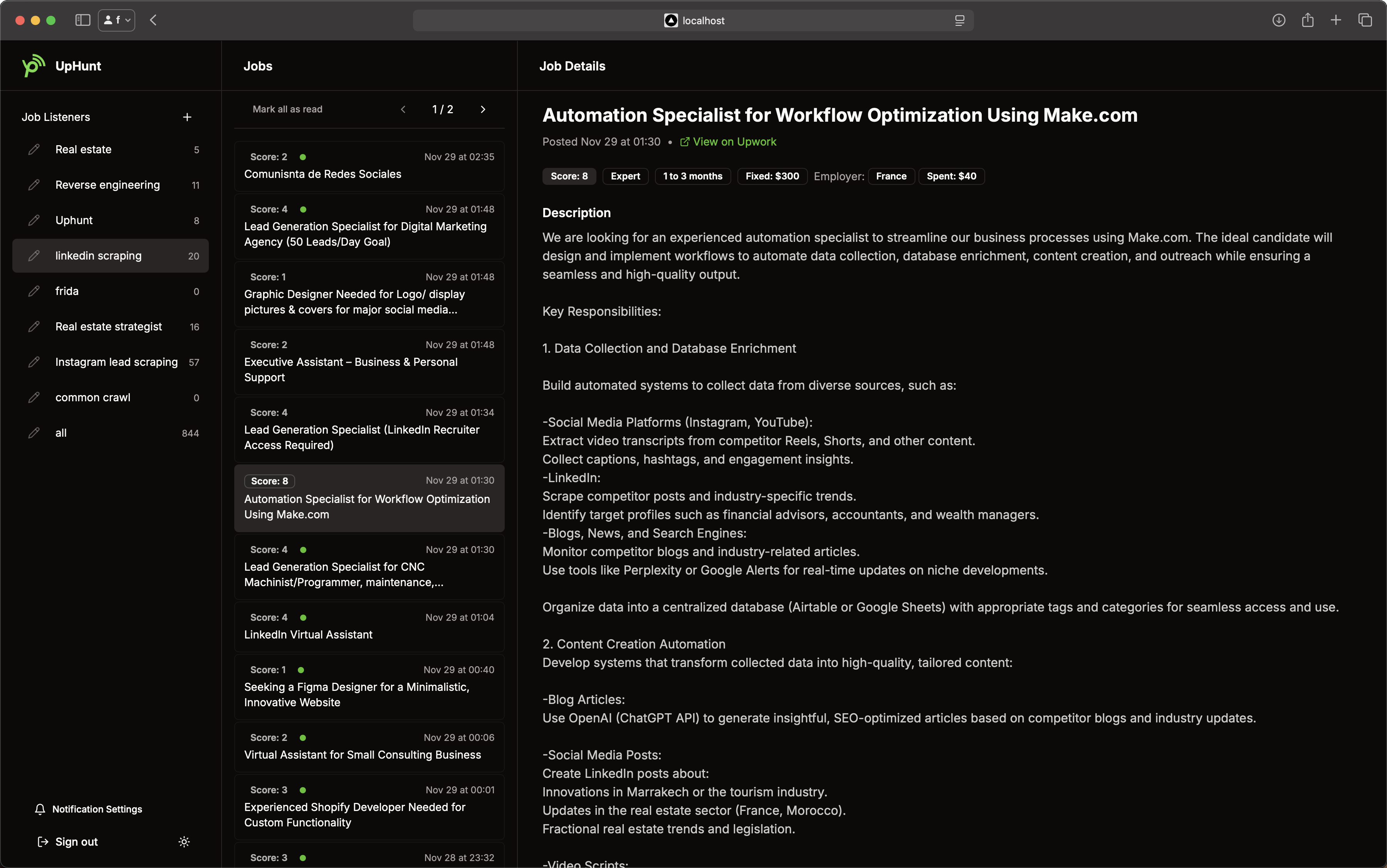
Ready to move faster? Set up your filters in minutes, connect Slack or Telegram, and let UpHunt surface the jobs worth applying to, before your competition even sees them.
Stop losing perfect projects to timing. UpHunt's AI-driven scoring and real-time alerts put you first in line. Start a 7-day UpHunt trial and see what fastest-to-apply actually feels like.
Originally published: 2026-01-26. Last updated: 2026-05-30.